
Raster Resampler
The Raster Resampler tool lets you resample existing rasters to a new resolution while keeping the original projection. It is useful for preparing raster data before training.
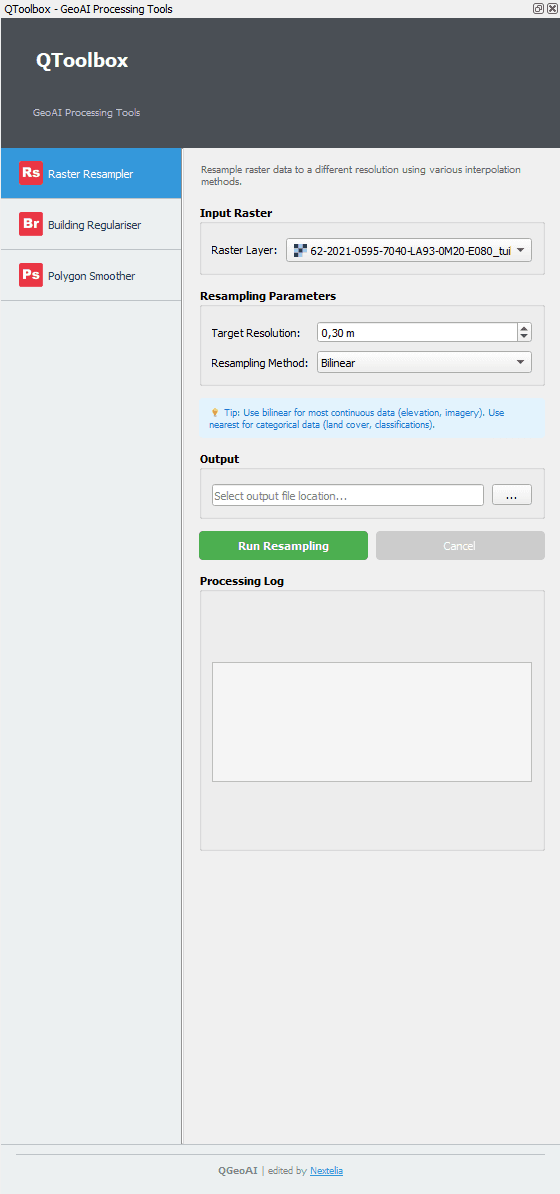
Input Raster
Select the raster to resample using the Raster Layer field listing all project rasters
Tip: Make sure the selected raster is correctly imported in the project and not locked by another operation.
Resampling Parameters
Target Resolution: Desired resolution for the output raster (e.g., 0.30 m)
Resampling Method: Interpolation method to apply
- Nearest
- Bilinear / Bilinear interpolation (weighted average of the 4 nearest pixels)
- Cubic / Cubic interpolation (weighted average of the 16 nearest pixels for smoother results)
Tip: Use Nearest for categorical data (e.g., soil classes), Bilinear for continuous values, and Cubic for smoother results on satellite imagery.
Output
Specify the path and name of the resulting raster file
Output File
Commands
- Run Resampling
- Cancel
Note: The 'Run Resampling' button executes the process with the selected parameters. 'Cancel' interrupts the operation.
Processing Log
Displays processing information: progress, possible errors, and summary of applied parameters
Tip: Monitor the log to check progress and detect potential errors.
Quick Workflow
- Select the raster in Input Raster
- Set Target Resolution and Resampling Method
- Choose Output File
- Click Run Resampling
- Check Processing Log for progress