
Assisted Annotation
The Assisted Annotation section allows the creation of segmentation annotations using SAM2 checkpoints, combining user interactions with automated predictions.
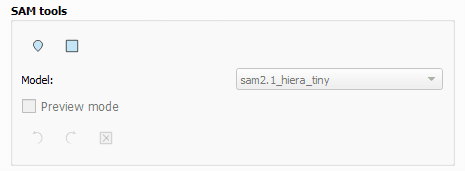
Assisted Tools
SAM Points
- Right click places positive points on the object to segment.
- Left click places negative points to exclude specific areas.
- Press Enter to permanently validate the annotation.
BBox Tool
- Click and drag to define a bounding box around the object to segment.
- The segmentation is automatically computed from the defined bounding box.
Model
- By default, QAnnotate uses sam2.1_hiera_tiny, the lightest model in the SAM 2.1 family, ensuring maximum compatibility and fast response times on all types of configurations.
- For more precise results, you can opt for the small, base, or large models. These more powerful models require more resources but offer superior segmentation quality.
Preview Mode
- When using the SAM Points tool, an optional Preview mode can be enabled.
- This mode allows dynamic preview of the segmentation result on hover.
- Preview helps refine point placement before final validation.
Additional Controls
- Undo and Redo actions allow navigation through recent annotation history.
- The Cancel action allows discarding the current assisted annotation before validation.
Segmentation Refinement
- For both tools, holding Ctrl while using the mouse wheel applies contour simplification.
- This interaction helps smooth and reduce the geometric complexity of generated segments.