
Data Preparation
The Preparation section allows you to select the raster to annotate, manage the class catalog, and define the annotation layer that will serve as the basis for your work.
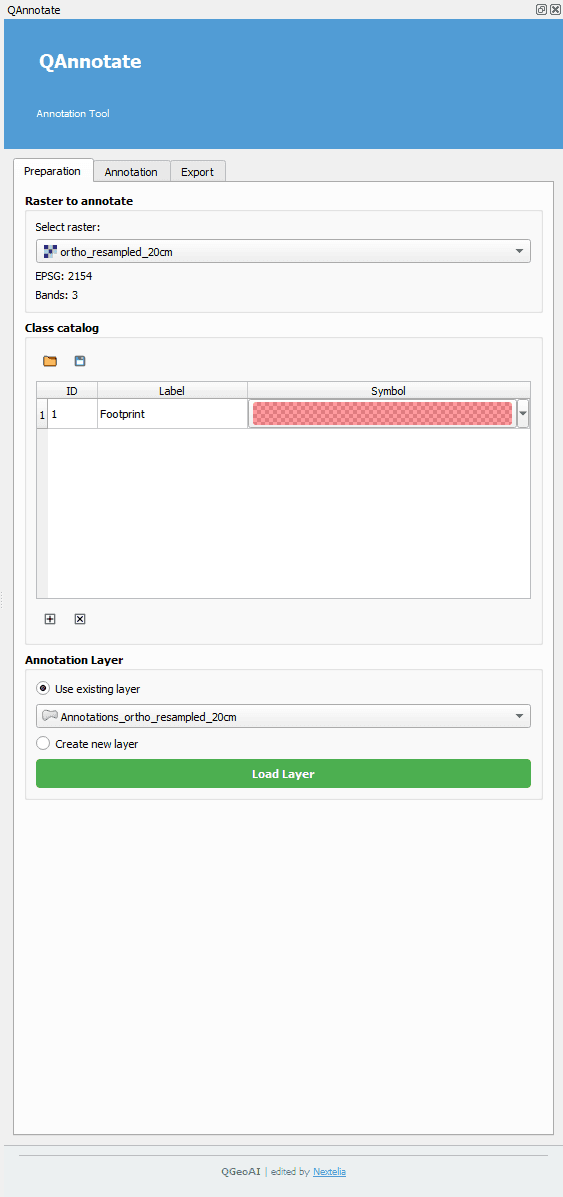
Raster to Annotate
- Select a raster already loaded in your QGIS project. This raster will serve as the base on which all annotations are created.
- Once a layer is selected, QAnnotate automatically retrieves the projection system (EPSG) and the number of bands.
- These details are stored as metadata throughout the project lifecycle, from annotation to training and inference.
Class Catalog
- The class catalog allows you to organize and standardize your annotation types.
- Use the folder button to load an existing catalog.
- Use the save button to store the current catalog.
- The catalog is displayed as a table with class ID, label, and symbol.
- The color assigned to each class is also stored as metadata, enabling reuse during model inference.
Annotation Layer
- You can create a new annotation layer or load an existing layer already present in the QGIS project.
- This layer will serve as the primary support for all annotations and can be modified or exported later.