
Outputs and advanced options
The Outputs and advanced options section defines how inference results are generated, stored, and integrated into the QGIS project. Available options automatically adapt to the selected model type.
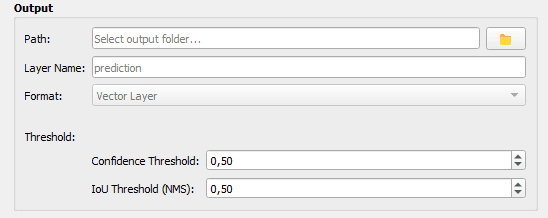
Common parameters
- Path: output folder path
- Layer Name: name of the output layer (default 'prediction')
- Format: output type adapted to the model
Warning: using an existing layer name will cause an error to prevent overwriting previous results.
Output formats by model
Mask R-CNN
- Raster layer
- Vector layer
SMP
- Raster layer
- Vector layer
- Prediction reliability
YOLO
- Vector layer only
Prediction reliability (SMP)
- Confidence map
- Uncertainty map (entropy)
Vector layer options
Simplify tolerance: geometric simplification (in pixels)
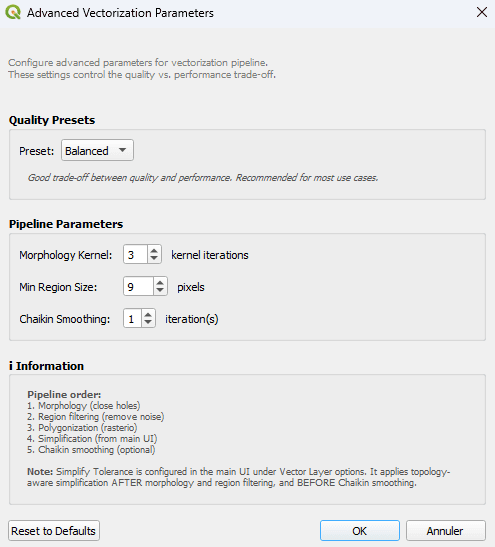
Advanced parameters
- Morphology kernel
- Kernel iterations
- Min region size (pixels)
- Chaikin smoothing (iterations)
Quality presets
- Fast: 2 kernel iterations, min region 16 px, 0 iteration
- Balanced: 3 kernel iterations, min region 9 px, 1 iteration
- Maximum: 5 kernel iterations, min region 4 px, 2 iterations
Thresholds and criteria
Mask R-CNN
Default threshold: 0.50
YOLO
- Confidence threshold: 0.50
- IoU threshold (NMS): 0.50
SMP
No threshold applied for semantic segmentation models