
QGeoAI Manager - Server Management
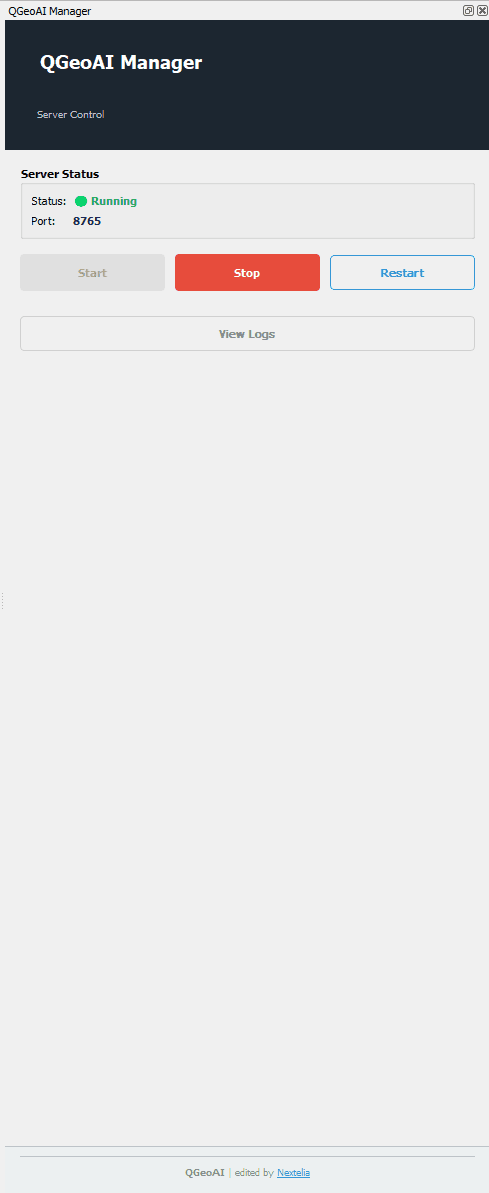
QGeoAI Manager is a complementary extension to the QGeoAI suite that enables managing the QGeoAI Server directly from the QGIS interface. It provides centralized control over server status, configuration, and logs, facilitating the daily use of the QGeoAI suite.
Objectives of QGeoAI Manager
- Provide an intuitive graphical interface to control QGeoAI Server
- Enable real-time monitoring of server status
- Facilitate problem diagnosis through access to logs
- Secure QGIS shutdown to prevent unintended server interruptions
Main Features
- Real-time display of server status (Running, Stopping, Restarting)
- Visualization of the port used by the server
- Controls to start, stop, and restart the server
- Access to detailed logs for diagnosis and technical support
- Protection against unintended shutdown when closing QGIS
Design Philosophy
- Interface consistent with other QGeoAI suite extensions
- Transparent and accessible server infrastructure control
- Safety mechanisms to prevent work loss
- Detailed logging to facilitate technical support
Using QGeoAI Manager
Starting the Server
Before using any QGeoAI suite plugin (QAnnotate, QModel Trainer, QPredict, QToolbox), you must start the server via QGeoAI Manager.
⚠️ Important: QGeoAI suite plugins will not open if the server is not active. QGeoAI Manager must be launched first to initialize the server environment.
Status Monitoring
The interface displays the server status and port used in real-time. Possible states are:
- Running: the server is active and ready to receive requests
- Stopping: the server is shutting down
- Restarting: the server is restarting (useful after configuration changes)
Log Consultation
QGeoAI Manager provides access to detailed server logs. This information is essential for:
- Diagnosing operational issues
- Understanding encountered errors
- Providing accurate information to technical support for quick resolution
Shutdown Protection
When you attempt to close QGIS while a QGeoAI Server session is active, a safety dialog appears to prevent unintended and abrupt server shutdown.
Two options are available:
- Arrêter le serveur : cleanly shuts down the server with QGIS (recommended if you don't plan to work again soon)
- Laisser le serveur actif : QGIS closes but the server continues running in the background, allowing faster restart of the QGeoAI suite in the next session (consumes system resources)
💡 This safety mechanism ensures you don't lose an ongoing work session and maintain control over system resource management.
QGeoAI Manager serves as the central control point for managing the QGeoAI server, ensuring smooth and secure use of the entire suite.