
QModel Trainer - Model Training
QModel Trainer is the GeoAI suite extension dedicated to training deep learning models directly within QGIS. It allows you to turn annotated datasets into models ready for inference with QPredict or other tools in the suite.
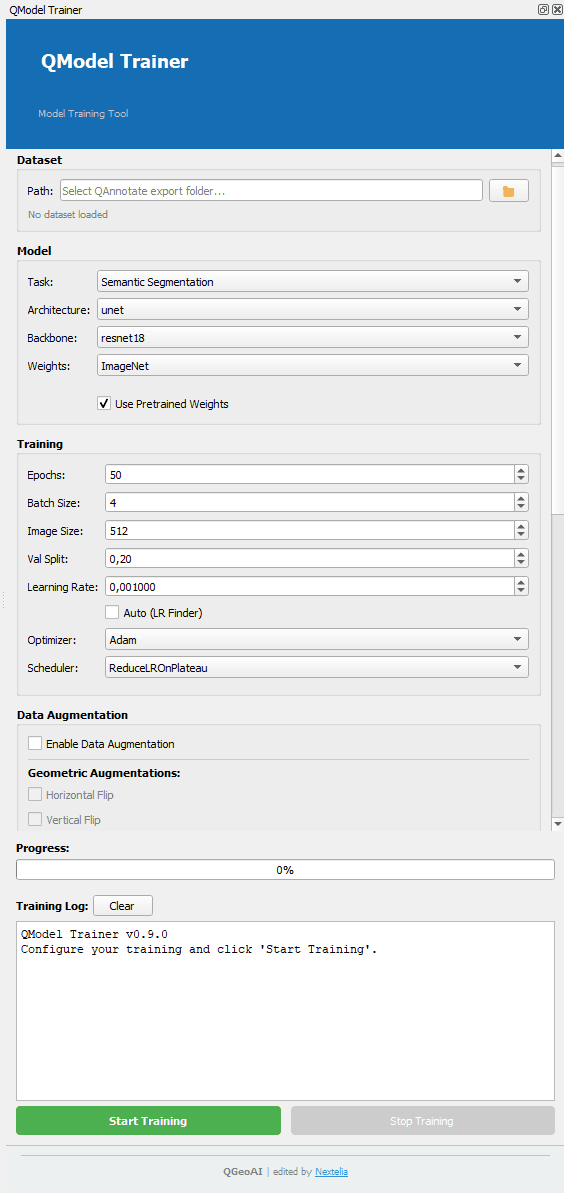
Objectives of QModel Trainer
- Enable training of GeoAI models from datasets created with QAnnotate.
- Intuitively manage training parameters, architectures, and associated tasks.
- Integrate data augmentation options to improve model robustness.
- Provide detailed training tracking with progress bars and log outputs.
General Workflow
- Load a GeoAI dataset in a supported format (mask, YOLO, etc.).
- Configure the model: task, architecture, backbone, and pretrained weights if available.
- Define training parameters: epochs, batch size, learning rate, validation split, optimizer, and scheduler.
- Enable geometric and radiometric data augmentation options according to dataset format compatibility.
- Select the training device (CPU, GPU).
- Set output parameters and advanced options (early stopping, save best model, resume from checkpoint).
- Monitor training in real-time via the progress bar and log window.
Design Philosophy
- Guided interface consistent with other GeoAI suite extensions.
- Clear separation between dataset, model, training parameters, and outputs.
- Automatic interface adaptation based on dataset format and selected task.
- Transparency and traceability through a detailed training log.
QModel Trainer is the essential link to go from annotated datasets to fully configurable, operational models, directly usable within a QGIS project.