
Model and input layer
The Model and input layer section allows users to define the inference model to use and the raster data on which the processing will be applied. This step is critical to ensure consistency between the model and the analyzed data.
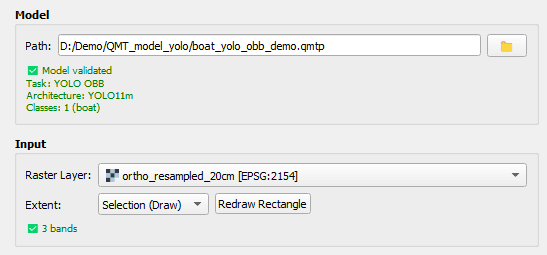
Model selection
The Model block allows loading a model trained with the QModel Trainer extension, using the QMTP format.
Model validation
- Display of the model task
- Display of the model architecture
- Display of the number of classes and their labels
This validation step ensures that the selected model matches the intended processing task.
Input raster selection
In the Input block, the user selects a raster layer already loaded in the QGIS project. This raster is used as input data for inference.
- Automatic verification of band count compatibility with the model
- Visual confirmation of band count matching
This check prevents errors related to incompatible input data.
Processing extent definition
QPredict allows limiting the processing area to match operational requirements.
- Full raster: process the entire raster
- Current viewport: process only the currently visible map area
- Selection (draw): manually define an area of interest
When Selection (draw) mode is enabled, users can draw a rectangle directly in the map view.
- The first click starts drawing the rectangle
- The second click validates the extent
Once defined, the button allows redrawing the rectangle if needed.